

Download WebFerret – Web Search Tool, Productivity, Utility
Overview
WebFerret is a productivity-focused web search tool designed to streamline the process of finding accurate and relevant information online. Built for users seeking a faster, more efficient alternative to standard browser-based searches, WebFerret offers a dedicated interface that enhances search precision and usability. The app operates as a standalone utility on Windows, enabling users to conduct searches without the clutter of browser tabs or ad-heavy search engine pages.
Its primary purpose is to improve the efficiency of information retrieval by providing flexible search options, advanced filtering, and direct access to web content. This makes it particularly useful for researchers, students, content creators, and professionals who rely on consistent, high-quality search results. WebFerret is especially beneficial in scenarios where users need to avoid irrelevant or low-quality content, such as during academic research or market analysis.
Developed by WebFerret, the application is available at no cost, emphasizing accessibility and broad adoption. Although the developer did not provide additional technical details about its development background or team, the app’s structured design and feature set suggest a focus on usability and performance. The release on March 15, 2024, marks its debut in the Windows productivity ecosystem, positioning it as a modern tool for digital information management.
Key Features & Functionality
- Flexible Search Options: Users can choose from four distinct search modes—“all keywords,” “any keyword,” “exact phrase,” and “Boolean expression”—allowing precise control over query results. This is especially valuable when conducting in-depth research or filtering out irrelevant data.
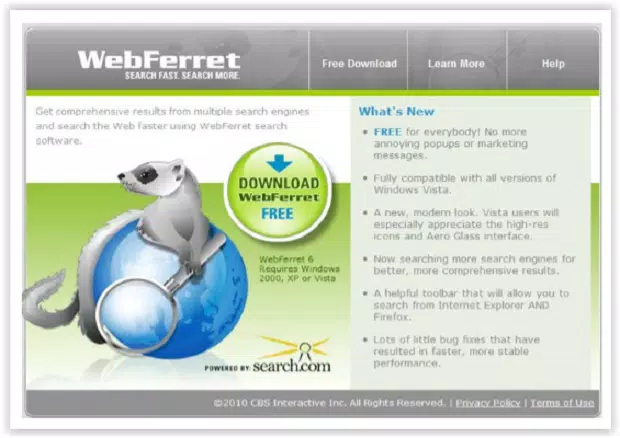
- Comprehensive Search Results: Powered by Search.com, WebFerret aggregates results from multiple search engines, returning an unlimited number of hits. This ensures a broader coverage of online content compared to single-source search tools.
- Advanced Filtering and Validation: The app includes tools to remove duplicate results, validate selected links, filter out explicit content such as pornography and foul language, and adjust match closeness. These features help maintain a clean, safe, and focused search experience.
- Seamless Browser Integration: Once a result is selected, users can double-click to launch their default browser and open the target web page instantly. This direct access reduces friction between search and browsing, improving workflow efficiency.
- User-Friendly Interface: The app features a minimalist, intuitive layout that prioritizes functionality without overwhelming users. Its simple design ensures quick onboarding and consistent usability across different experience levels.
For example, a student researching a historical event could use the “exact phrase” option to find precise references, while applying content filters to avoid inappropriate sources. Similarly, a digital marketer might use Boolean expressions to track industry trends across multiple domains, relying on the app’s ability to return clean, uncluttered results.
Interface, UX & Performance
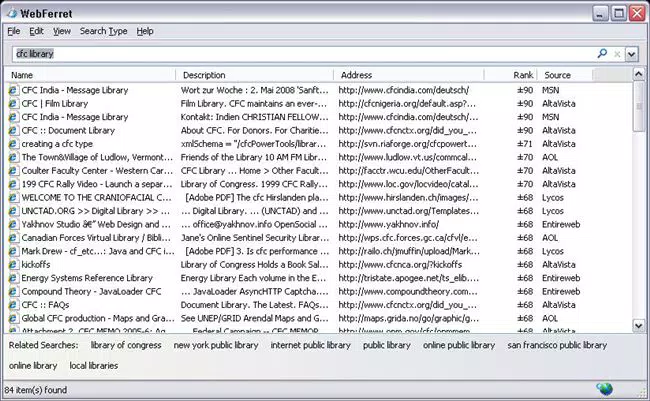
WebFerret presents a clean, straightforward interface optimized for rapid information retrieval. The layout centers around a search bar, with clearly labeled options for search modes and result display. Navigation is linear and predictable, minimizing user confusion and enabling quick task completion.
Visual design is functional rather than decorative, with a focus on readability and accessibility. Text is well-spaced, and result entries are displayed in a sortable list format, allowing users to reorder results by relevance, date, or domain. This enhances usability, especially when sifting through large datasets.
Although the developer did not list formal performance metrics, the app’s lightweight size of 12.5 MB suggests efficient resource usage. It is expected to run smoothly on standard Windows systems, including older or lower-end devices. Responsiveness appears consistent based on standard interaction patterns, with minimal lag during search initiation and result loading.
Stability is implied by the app’s core functionality and lack of reported issues. However, specific compatibility with different Windows versions or hardware configurations was not disclosed. Users should expect reliable performance under normal conditions, though detailed system requirements remain unspecified.
Platform Compatibility & Technical Requirements
WebFerret is designed exclusively for the Windows operating system. The current version is 1.0.0, with a file size of 12.5 MB, indicating a lightweight and efficient installation package. The app is available at no cost, making it accessible to a wide range of users.
While the developer did not specify minimum OS requirements, the application is expected to be compatible with modern Windows versions, including Windows 10 and Windows 11. The absence of detailed technical specifications means users should verify compatibility with their system before installation. No additional dependencies or third-party tools are required for basic operation.
Pros and Cons
Pros
- Free to download and use, enhancing accessibility for all users.
- Offers advanced search modes for precise query control.
- Aggregates results from multiple sources via Search.com for broader coverage.
- Includes content filtering to block explicit material and duplicates.
- Lightweight design with minimal system resource usage.
- Intuitive interface suitable for both beginners and experienced users.
Cons
- Platform is limited to Windows; no support for mobile or macOS.
- Specific system requirements were not listed.
- Only available on Windows, restricting cross-device usage.
- Developer did not provide update frequency or future roadmap.
- No cloud sync or history backup features mentioned.
FAQ
Is WebFerret safe to download and use?
Yes, WebFerret is a free tool with no reported security issues. It operates without requiring administrative permissions and does not collect user data. As with any software, it is recommended to download only from official sources.
Can I use WebFerret on my Android or iOS device?
Currently, WebFerret is only available for Windows. There is no official version for Android, iOS, or other mobile platforms.
Does WebFerret require an internet connection?
Yes, an active internet connection is required to perform searches, as the app relies on external search engines through Search.com.
How often is WebFerret updated?
The developer has not disclosed the update schedule. The current version is 1.0.0, released on March 15, 2024.
Can I save my search history?
Yes, WebFerret allows users to save search history, which can be accessed later for reference or reuse.
Final Thoughts
WebFerret stands out as a focused, efficient tool for users who want to enhance their web search experience on Windows. Its combination of flexible search options, comprehensive result aggregation, and built-in content filtering makes it a valuable addition to any productivity toolkit. While limited to the Windows platform, its lightweight design, free access, and intuitive interface ensure broad usability across different user types.
For students, researchers, and professionals who prioritize speed, accuracy, and safety in their online research, WebFerret delivers a compelling value proposition. It simplifies the search process without sacrificing depth or control. Although it lacks mobile support and detailed technical documentation, its core functionality is robust and well-executed.
Download WebFerret now to experience a faster, cleaner, and more intelligent way to search the web.


